
Augment your AI-powered Bolt app with PWA and Push Notifications
Turn your AI-built Bolt app into an installable PWA with push notifications—all with a single prompt.


Getting started with Bolt & Progressier
-

1Create a new Bolt PWA
Navigate to the New PWA page, choose Bolt as Integration Method, enter the URL of your Bolt project, and create your account.
-
2Copy and paste the integration prompt
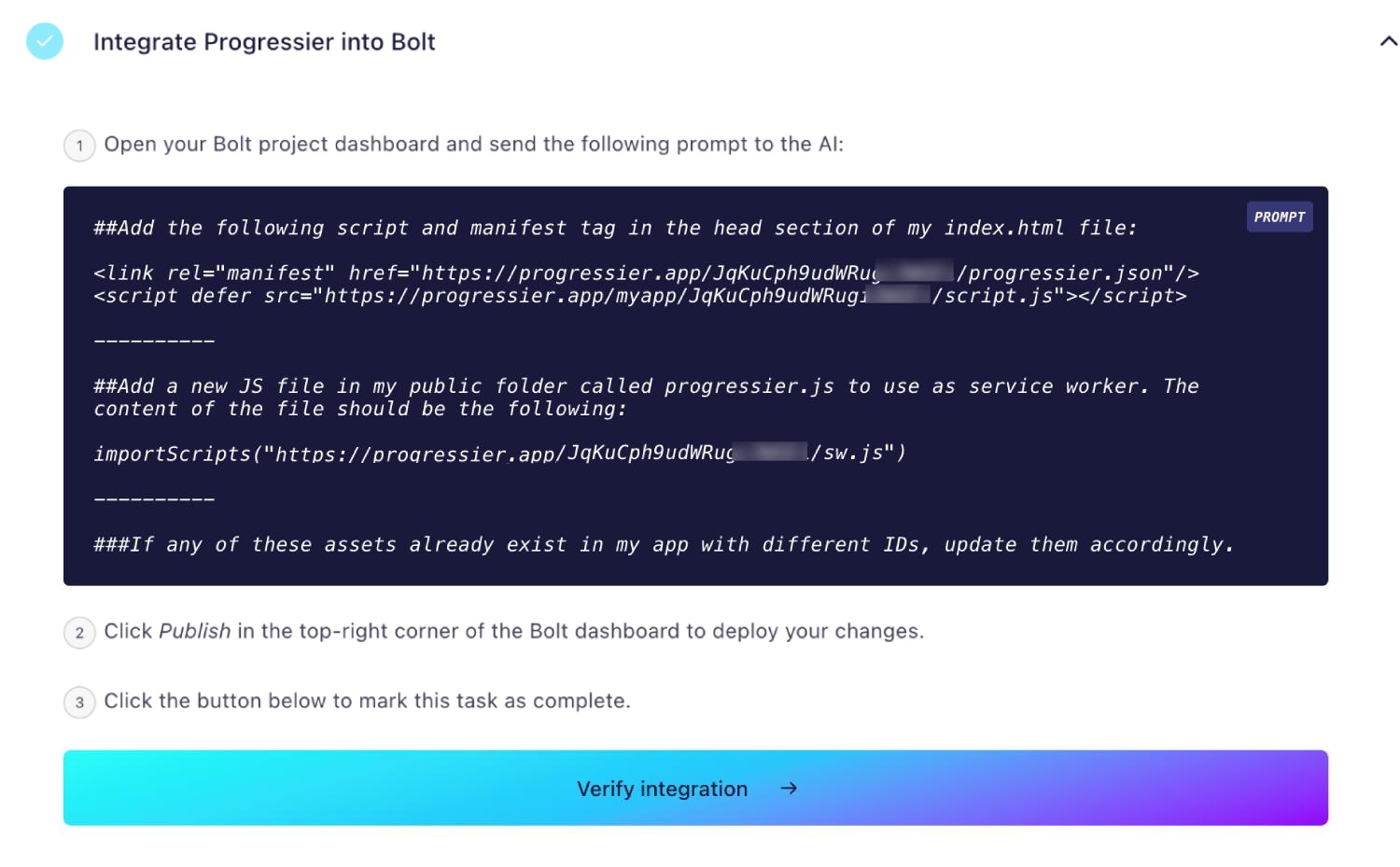
In the Progressier dashboard, you'll find a ready-to-use integration prompt. Simply copy and paste it directly into the Bolt AI Editor. This prompt will automatically create a manifest and service worker in your project.
-

3Test your integration
Now it's time to take it for a spin. Open your website, install it, enable notifications, and send yourself a test notification—you're all set!
Which PWA features does Bolt support?
Android Installation
Get your PWA installed on any Android smartphone or tablet, just like a native app.
iOS Installation
Progressier walks users through the process of installing your app on their iPad or iPhone.
Windows Installation
Your Bolt PWA is installable from Google Chrome and Microsoft Edge and can be added to a Desktop or Taskbar.
macOS Installation
Get your app installed on macOS from Chrome — Progressier walks users through installing your PWA to their Docks.
Chrome OS Installation
Let users add your PWA to their Chrome OS laptop.
Installation Page
An app-store like installation experience for your PWA — without the hassle of managing Google Play/App Store listings.
Original Domain Installation
Your app is directly installable right from your own domain.
Web App Manifest
Progressier creates an app manifest with the name, logo, theme color and display preferences of your PWA.
Service Worker
A service worker is JS file that runs separately from the main browser thread. It can intercept network requests (allowing to put resources in the cache or retrieve them from there) and deliver push notifications to someone even when they're not actively using your app. With Progressier, you can define these rules without having to write any code at all.
Push Campaigns
Notify all your users of news in your app with our dashboard and/or API. Progressier manages all user push subscriptions for you.
Personalized Notifications
Send notifications to any particular user manually or programmatically. All your need is their email, their user ID or any other information that identifies them in your system.
Connect User Data
Connect your own user data (emails, account type, etc). So when a user authorizes push notifications in your Bolt PWA, their data is also saved along with it.
In-App PWA Promotion
Promote installation of your PWA with a floating action button in the body of your app.
Offline Alerts
Show a custom alert when a user loses network connectivity.
Request Notifications After Installation
Progressier asks users to allow notifications right after they've installed your app, which generally results in a higher subscription rate
Install & Push Analytics
Progressier tracks installs of your Bolt PWA over time. Also tracks push subscriptions.
Programmatic PWA Creation
Create Bolt PWAs programmatically with our API.
Google Play & App Store Upload
With our PWABuilder integration, you can list your Bolt PWA on Google Play or the App Store.
Why choose Bolt and Progressier for your PWA?
Bolt is one of the fastest tools for building websites, offering unmatched speed when it comes to developing a Progressive Web App (PWA). With a single prompt, Progressier gives you everything you need to turn your Bolt project into a fully functional PWA, complete with push notifications, universal installation, analytics, and widgets.
Bolt apps and SEO
Apps built on Bolt.new can actually have fantastic SEO, but you have to flip the right switches. Out of the box, they rely on client-side JavaScript, which search engine bots can sometimes struggle to read. The good news? Bolt offers built-in Server-Side Rendering (SSR) features that serve up fully rendered, search-friendly HTML right from the start. Once you enable SSR, nail down your standard meta tags and headings, and get your first backlinks, your Bolt app will compete perfectly fine in the search rankings!

Ready to turn your Bolt app into a PWA?
Try our PWA builder free of charge for 14 days. No credit card required.
Generate PWA See plans